Sometimes we forget or confuse about the Android version and what its name, but there is no necessity for us to memorize Android versions and their name pairs. :)
This is default featured slide 1 title
Go to Blogger edit html and find these sentences.Now replace these sentences with your own descriptions.This theme is Bloggerized by NewBloggerThemes.com.
This is default featured slide 2 title
Go to Blogger edit html and find these sentences.Now replace these sentences with your own descriptions.This theme is Bloggerized by NewBloggerThemes.com.
This is default featured slide 3 title
Go to Blogger edit html and find these sentences.Now replace these sentences with your own descriptions.This theme is Bloggerized by NewBloggerThemes.com.
This is default featured slide 4 title
Go to Blogger edit html and find these sentences.Now replace these sentences with your own descriptions.This theme is Bloggerized by NewBloggerThemes.com.
This is default featured slide 5 title
Go to Blogger edit html and find these sentences.Now replace these sentences with your own descriptions.This theme is Bloggerized by NewBloggerThemes.com.
Jumat, 08 September 2017
How to Know Android Version and Its Name
Sometimes we forget or confuse about the Android version and what its name, but there is no necessity for us to memorize Android versions and their name pairs. :)
Sign in to Safe Mode Samsung Galaxy S5
To determine whether the problem is caused by the App / application you installed or because of the problematic hardware, then we can run the smartphone in the Safe Mode position as well as on the computer.
How to Find Apps Quickly on Android
For those of you who do not know, the easy way to find the App is already installed on Android is to use Google Search. Type the name of the app on Google Search, it will show the application we are looking for, if the app we are looking for is not yet / has not been installed then search engines will search through the internet as generally searching / Googling on the Internet.
So the function of Google Search on Smartphone or Tablet Android in addition to searching to the internet also serves to search for applications installed on the Android device.
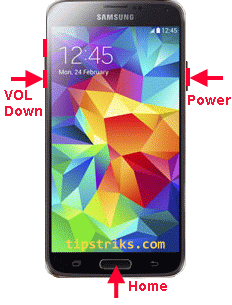
How to Capture / Grab Screen on Samsung Galaxy S4 S5 Without Additional App
Without using any application we also can do screen grab by pressing the Volume Decrease button, and Power button .
The trick is to open the screen we want to capture, then press the three buttons simultaneously until you hear the sound of photographing as well as on the camera.
Anticipate if Android is Lost or Stolen
Setting Language on Samsung Galaxy S5
Intentional or unintentional, for example, the language changes to a language you do not understand, for example, to Russian, Vietnamese or Chinese, if you are not familiar with the menus it would be difficult to return to the language you want.
To enter the language setting menu / setting language on Samsung Galaxy S5 (or on other devices) we can see from other devices that use language that we understand. We can see the icon form to enter the menus we want.
Mouse on Android Tab
There are several apps on Android that I think are required to use the mouse, including the Remote Desktop application Computer, remotely using the Android device, can be seen in the previous post: Remote desktop computer using Android .
Generally the Android tab does not have a standard USB port as it is on a laptop or computer, which is usually only a micro or mini USB terminal.
(OTG = On The Go)
![]() |
| OTG Micro USB Cable |